Important Information About Your Experience Kit
You are now holding your kit in your hands. To start your test phase, we provide you with the most important information on one page. Additionally, you will have a short onboarding call with your contact person at our company, who will assist you with the commissioning.
The Experience Kit at a Glance
Clicking on one of the tiles will take you to further information.
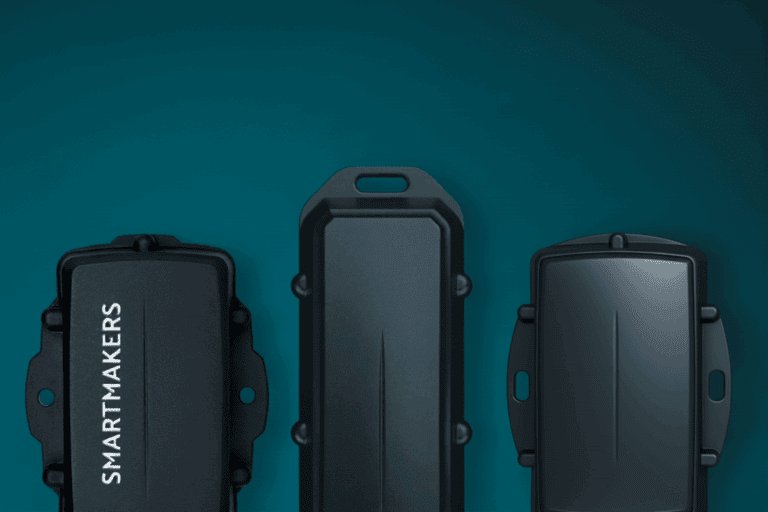
What You Should Know About Our Trackers
These are common questions we receive about our trackers. Please note the information provided here to optimally use the trackers for your test phase.
Information About Our Platform
Our thingshub Connected Operations Cloud is the heart in combination with our trackers. Here you will find, in addition to the localization of your assets, other valuable information. The access for the test environment can be found on the card included in your Experience Box.
| Functions | Experience Box | PoC / Live Operation |
|---|---|---|
Tracking Enables precise location determination and movement detection of your assets in real-time – based on the latest IoT tracker and network standards. | During the test phase, you will experience basic asset tracking with the predefined trackers. Ideal for gaining initial insights into location tracking with our platform. | Enables individual tracking of real assets. Through business object management and configurable views, specific logics and processes can be mapped. |
Alerts Automatic notifications for defined events, e.g., movement, temperature deviations, or unexpected location changes. | This function is unfortunately not available in the test environment. | Set up individual alerts for geofences, movements, or status changes. Notifications can be flexibly defined for shipments, zones, or sensor values – for maximum transparency in real-time. |
Dashboards Individually customizable overviews that visually and comprehensibly display relevant key figures, positions, and events of your assets. | This function is unfortunately not available in the test environment. | Create your own dashboards to visualize relevant data, e.g., battery status or sensor events. Individual widgets and logics enable targeted monitoring (e.g., shock or temperature alerts). |
Devices Management and monitoring of all connected IoT devices – from commissioning to firmware updates to status control. | Displays a standardized overview of connected devices. | Comprehensive device management with individual management, sorting via labels, and extension through "Custom Fields". Ideal for structured organization of your IoT infrastructure. |
Data Central data storage and processing – enables analyses, connection, or integration into existing systems. | This function is unfortunately not available in the test environment. | Flexible data interfaces enable exchange with external systems. Data can be exported in tables, visualized in dashboards, and processed through individual logics. |
Mapping Map-based visualization of your assets, including location history, zone definition, and geofencing functions. | Display of your own location for orientation within the platform. | Create and manage individual locations, geofences, and indoor areas. Ideal for asset, event, and zone analyses. Supports High Precision BLE Tracking and location-based automations. |
User Management Role and rights-based user control – for secure, controlled access to functions and data within the platform. | Individual, yet standardized access to our thingshub Connected Operations Cloud. | Advanced user and role management for defining individual access rights. Supports multi-level permissions and ensures compliance in productive environments. |
Experience Box
Tracking
Enables precise location determination and movement detection of your assets in real-time – based on the latest IoT tracker and network standards.
During the test phase, you will experience basic asset tracking with the predefined trackers. Ideal for gaining initial insights into location tracking with our platform.Alerts
Automatic notifications for defined events, e.g., movement, temperature deviations, or unexpected location changes.
This function is unfortunately not available in the test environment.Dashboards
Individually customizable overviews that visually and comprehensibly display relevant key figures, positions, and events of your assets.
This function is unfortunately not available in the test environment.Devices
Management and monitoring of all connected IoT devices – from commissioning to firmware updates to status control.
Displays a standardized overview of connected devices.Data
Central data storage and processing – enables analyses, connection, or integration into existing systems.
This function is unfortunately not available in the test environment.Mapping
Map-based visualization of your assets, including location history, zone definition, and geofencing functions.
Display of your own location for orientation within the platform.User Management
Role and rights-based user control – for secure, controlled access to functions and data within the platform.
Individual, yet standardized access to our thingshub Connected Operations Cloud.
PoC / Live Operation
Tracking
Enables precise location determination and movement detection of your assets in real-time – based on the latest IoT tracker and network standards.
Enables individual tracking of real assets. Through business object management and configurable views, specific logics and processes can be mapped.Alerts
Automatic notifications for defined events, e.g., movement, temperature deviations, or unexpected location changes.
Set up individual alerts for geofences, movements, or status changes. Notifications can be flexibly defined for shipments, zones, or sensor values – for maximum transparency in real-time.Dashboards
Individually customizable overviews that visually and comprehensibly display relevant key figures, positions, and events of your assets.
Create your own dashboards to visualize relevant data, e.g., battery status or sensor events. Individual widgets and logics enable targeted monitoring (e.g., shock or temperature alerts).Devices
Management and monitoring of all connected IoT devices – from commissioning to firmware updates to status control.
Comprehensive device management with individual management, sorting via labels, and extension through "Custom Fields". Ideal for structured organization of your IoT infrastructure.Data
Central data storage and processing – enables analyses, connection, or integration into existing systems.
Flexible data interfaces enable exchange with external systems. Data can be exported in tables, visualized in dashboards, and processed through individual logics.Mapping
Map-based visualization of your assets, including location history, zone definition, and geofencing functions.
Create and manage individual locations, geofences, and indoor areas. Ideal for asset, event, and zone analyses. Supports High Precision BLE Tracking and location-based automations.User Management
Role and rights-based user control – for secure, controlled access to functions and data within the platform.
Advanced user and role management for defining individual access rights. Supports multi-level permissions and ensures compliance in productive environments.
How to Test Trackers and Platform in Interaction
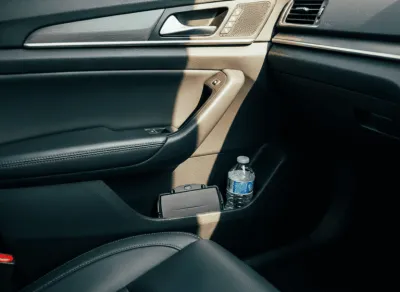
Place the Tracker
Place one of the trackers in the side door of your car or on the dashboard. Make sure the device has a clear view of the sky (better GPS connection).
Start Your Drive
Drive around your area for about 10–15 minutes. Feel free to switch between city, country, or parking lot – this shows differences in position accuracy.
Observe the Data
Then open the platform to see your route and position points. This way, you can track the movement path (route on the map) and speed through timestamps.
Understand the Data
The tracker regularly sends position data over the radio network to the platform. There they are visualized and supplemented with additional data.

Contact Us
Do you have questions? Then schedule a personal appointment with your contact person. Together we will discuss questions from your test phase or analyze your personal use case. We are happy to advise you on possible solutions and potentials.